Architecture & Data Processing
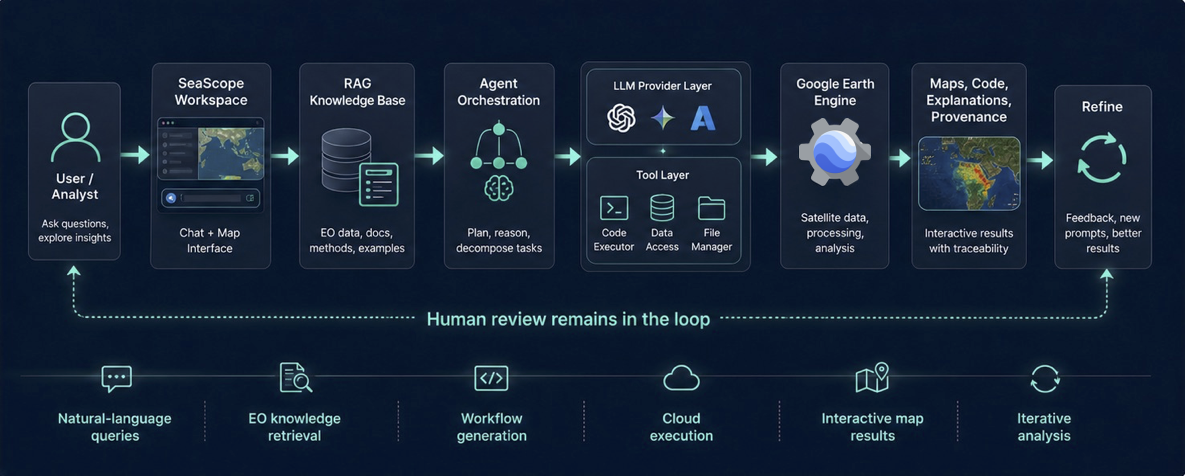
SeaScope (Earth Observation) is a browser-first Earth Engine workspace where:
- The AI agent helps you write/modify a GEE JavaScript script.
- The script is executed client-side in a sandboxed iframe.
- The map displays results as Earth Engine tile layers.
- The backend provides persistence for scripts and geometries, plus the broader Gendox AI/semantic-search system used by the agent.
High-level system diagram
GEE authentication and session lifecycle
SeaScope uses the Earth Engine JavaScript client (@google/earthengine) in the browser to:
- start OAuth sign-in,
- store the access token locally,
- and initialize the EE runtime for session readiness checks.
Key properties:
- The access token is stored in
localStorage(per browser/profile). - A banner is shown when the session is expired, and the user can reconnect.
- The token is used for:
- executing scripts inside the sandbox iframe,
- fetching Earth Engine image/thumbnail responses (authorized fetch).
The GEE sandbox: why an iframe
SeaScope executes Earth Engine JavaScript in a hidden iframe (public/gee-sandbox/gee-sandbox.html).
This design provides:
- Isolation: separates the EE evaluation environment from the main UI runtime.
- A strict message protocol: the iframe returns only structured data (layers, prints, exports).
- Recoverability: SeaScope can re-mount a fresh iframe per run (new
iframeKey) for clean state.
The iframe loads EE libraries and exposes a controlled Map proxy that translates user code effects into postMessage events for the parent.
Sandbox message protocol (parent ↔ iframe)
SeaScope communicates with the sandbox using window.postMessage (parent ↔ iframe).
Parent → Iframe
EXECUTE: run the provided code with{ token, geometries }.GEE_FETCH_OPERATION: poll an export/operation by name or id.CANCEL_EXPORT: request cancellation of a running operation.GET_THUMB: request a thumbnail/screenshot capture of the current map result.
Iframe → Parent
IFRAME_READY: sandbox initialized and ready to execute.SUCCESS: script ran; includes newly-added layer(s) and metadata.ERROR: execution error payload.PRINT: aprint()message emitted by the script.CENTER: request map center/zoom updates.ZOOM: request zoom to bounds/geometry.CLEAR_LAYERS: request removal of current overlays.MAP_OPTIONS: map configuration changes.THUMBNAIL/SCREENSHOT: capture result; parent may fetch bytes via authorized HTTP.EXPORT_STARTED: an export/operation was started by the script.GEE_OPERATION_RESULT: polling result for an operation (used to update status UI).
AI agent loop (semantic search → code patch)
On the backend, CompletionService runs a tool-calling loop:
- It assembles a message list (system prompt + conversation + tool results).
- It calls a model provider (OpenAI/Anthropic/etc.).
- If the model returns tool calls, the backend executes supported tools and appends tool results back to the conversation context.
For SeaScope, the most important outcome is code editing:
- The agent produces a patch tool call (e.g.
apply_range_patch) targeting the editor content. - The frontend applies the patch to the Monaco editor (the script buffer).
What context the agent can use
SeaScope can provide agent-visible context such as:
- current script (as a “file”),
- recent print logs,
- drawn geometries (AOIs),
- optionally, screenshots/thumbnail images (when wired into chat contexts).
Persistence model (backend)
SeaScope persists only what must survive sessions:
EOScript (versioned scripts)
- Stored as text (
scriptContent) and metadata (title, description). - A “latest version” flag is maintained, and identical content is de-duplicated (no new version created if unchanged).
EOTaskGeometry (AOIs)
- Stored as JSONB coordinates with a type (polygon/point/etc.) and display order.
- Used as inputs to scripts via the
geometries[]runtime array.
REST API surface
The backend exposes EO-specific endpoints under:
/organizations/{organizationId}/projects/{projectId}/tasks/{taskId}/earth-observation
GET/POST /eo-scriptsGET /eo-scripts/latestGET/POST /eo-geometriesPUT/DELETE /eo-geometries/{geometryId}DELETE /eo-geometries(bulk)
Workspace layout architecture (frontend)
SeaScope uses a 3-panel grid:
- Map (Leaflet)
- Editor (Monaco)
- Chat (Gendox Widget iframe)
Panels are always mounted to avoid expensive remounts:
- layout changes (maximize/minimize/split ratios) are applied via CSS,
- state is kept in a dedicated Redux slice (
src/store/earthObservation/).
Chat widget bridge (frontend)
SeaScope embeds the Gendox chat as a widget (iframe + injected script).
The ChatPanel bridges the widget to the workspace by providing:
- local context providers (script text, logs, geometries),
- tool handlers (patching the editor, triggering run, etc.),
- shared refs (
panelState) so chat can access editor/run/map behaviors without prop drilling.